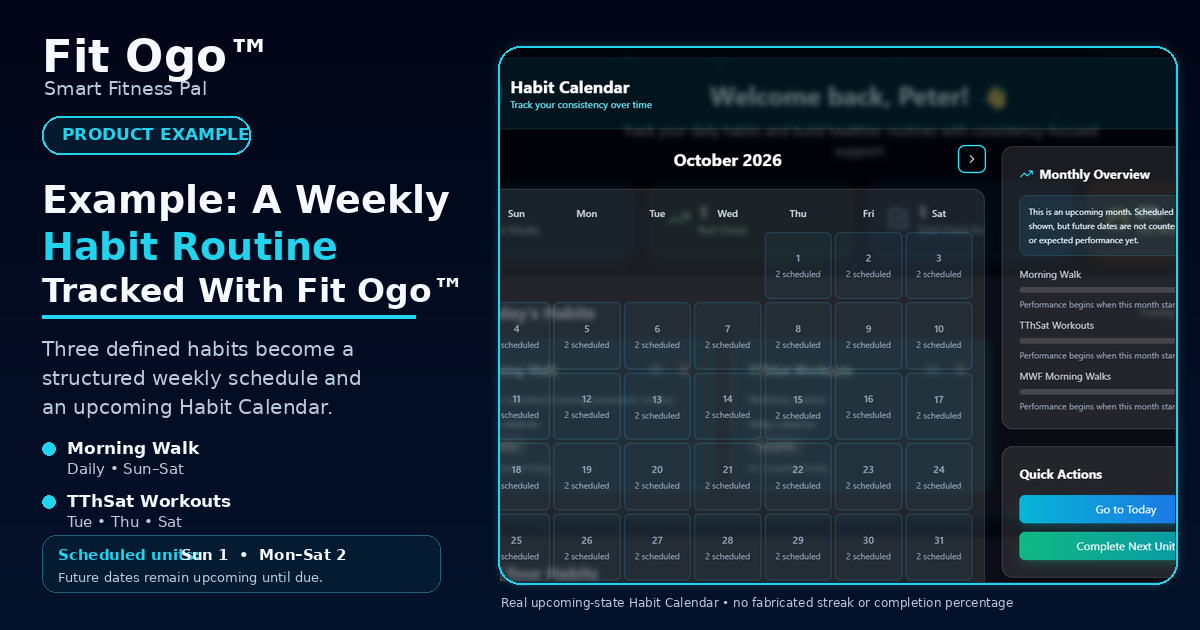
What does a real Fit Ogo™ Habit Tracker setup look like? This example shows one controlled routine built from three habits with different weekly schedules.
Rather than presenting an invented streak or completion percentage, the example focuses first on what the product can directly demonstrate from the habit configuration itself: which habits are expected on which days, how those expectations appear in the Habit Calendar, and how future dates are separated from actual performance.
The example contains one daily habit, one workout habit scheduled on Tuesday, Thursday and Saturday, and one walking habit scheduled on Monday, Wednesday and Friday.
Before You Review the Example
Product example — not a prescribed habit routine
This article shows one Fit Ogo™ Habit Tracker configuration for demonstration purposes. The habit names and schedule belong to this example and should not be treated as recommendations for another person. Fit Ogo™ allows users to choose the routines they want to track.
The Three Habits in This Example
The example uses three defined habits so the resulting weekly schedule can be traced directly back to the user-selected habit configuration.
- Habit 1
- Morning Walk — Daily — Sunday through Saturday
- Habit 2
- TThSat Workouts — Weekly — Tuesday, Thursday, Saturday
- Habit 3
- MWF Morning Walks — Weekly — Monday, Wednesday, Friday
How the Weekly Schedule Is Formed
When the three habits are combined, Sunday contains the daily Morning Walk only. Every other day contains the daily Morning Walk plus one selected-day habit.
- Sunday
- 1 scheduled unit
- Monday
- 2 scheduled units
- Tuesday
- 2 scheduled units
- Wednesday
- 2 scheduled units
- Thursday
- 2 scheduled units
- Friday
- 2 scheduled units
- Saturday
- 2 scheduled units
What the Habit Calendar Shows
Once those habits are created, Fit Ogo™ can present the routine in the Habit Calendar.
For this example, the October 2026 calendar shows one scheduled unit on Sundays and two scheduled units on Monday through Saturday. That pattern follows directly from the three habits and their selected days.
The calendar therefore provides a visible schedule before completion history is interpreted: it can show what is expected and, later, what was actually recorded.
Future Dates Are Not Counted as Failures
The product-proof screenshot intentionally uses an upcoming month. Scheduled habits are visible, while future dates are not counted as completed, missed, or expected performance yet.
This keeps scheduled activity separate from actual completion evidence. A workout scheduled for a future Saturday can appear as scheduled without reducing a current completion rate before Saturday arrives.
- Completed — a due habit unit was recorded as completed.
- Missed — an expected date has passed without the supported completion record.
- Not yet due — the scheduled date is still in the future.
What Can Be Reviewed After Check-Ins Exist
As real completion history accumulates, the Habit Tracker can derive broader consistency information for review.
- Current scheduled streak
- Best streak
- Total check-ins
- Weekly completion
- Monthly completion
- Calendar completion patterns
Why This Example Uses Schedule Evidence First
A habit-tracking product can look more impressive if a large streak or high completion percentage is placed on the screen, but those numbers only become meaningful product proof when they come from actual completion records.
For that reason, this example begins with the part that can be certified directly: the habits that were created, the days assigned to them, the resulting weekly structure, and the calendar behaviour those inputs produce.
How Workout Planner Can Connect to This Routine
The TThSat Workouts habit demonstrates how Habit Tracker can complement workout planning.
A user can review an existing workout schedule and manually create a habit around the training days that matter to them. Fit Ogo™ does not automatically create that habit simply because a workout exists in a plan.
The connection remains user-controlled: plan the workout, choose what you want to track, create the habit, record the check-in, and review the pattern.
Why Your Habit Routine May Look Different
This example should not be treated as the one Habit Tracker structure Fit Ogo™ expects everyone to use. Changing the configuration changes the resulting schedule and later changes the consistency record.
- A daily habit can appear on every eligible day.
- A selected-day habit appears only on the days you choose.
- A habit with multiple scheduled units can create more than one expected check-in on the same day.
- Changing the start date can change when the habit begins contributing to the routine.
- Changing or deleting a habit changes the tracking context.
- Your own completion history will produce different streak and consistency results.
Review Your Own Habit Setup
Before relying on a habit-tracking routine, review whether the structure still reflects what you actually intend to do.
- Is the habit clear enough to know when it is complete?
- Does the selected frequency reflect the routine you actually intend to follow?
- Are the chosen days realistic?
- Do scheduled times help, or do they add unnecessary rigidity?
- Are you tracking too many behaviours at once?
- Are you recording completions only when they actually happen?
- Does the routine still fit your current circumstances?
Create a Habit Routine Around Your Own Choices
The value of this example is not that every Fit Ogo™ user should create these three habits.
It demonstrates how a set of user-defined habits can become a weekly structure, scheduled calendar units, recorded check-ins, and later reviewable consistency information.
Your own Habit Tracker can reflect the routines you decide are relevant to you.
Fit Ogo™ Habit Tracker
Create a Habit Routine You Can Track
Choose the habits that matter to your routine, select when they apply, record your own check-ins, and review consistency over time with Fit Ogo™ Habit Tracker.
Explore the Fit Ogo™ Habit TrackerExplore Related Fit Ogo™ Guides & Tools
How to Build a Habit Routine You Can Actually Track
Learn the practical steps for defining, scheduling, recording, and reviewing a habit routine.
How to Build a Workout Routine Around Your Schedule
Build a practical workout structure that can provide context for workout-day habits.
Track Your Fitness Progress
Record and compare supported fitness progress information over time with Fit Ogo™.
Fitness & wellness education only. Fit Ogo™ provides general fitness, nutrition, habit, meditation, and wellness education and tracking support only. It does not provide medical advice, diagnosis, treatment, psychological treatment, or behavioural-health treatment. The habits, schedules, calendar structure, and any later consistency statistics shown in product examples are tracking information, not recommendations for another person or assessments of motivation, mental health, or medical status. Choose routines appropriate to your circumstances and follow relevant professional guidance where applicable.